Intro#
The Microsoft Agent Framework has been around for a while now and, with the 1.0.0 release, it is officially generally available. What is it you say? You might have heard about the open-source frameworks Semantic Kernel and AutoGen for building agentic apps? Both have their strengths and their weaknesses and are lacking capabilities of the other. The Microsoft Agent Framework combines the best of both worlds with enterprise grade features, tool & protocol interoperability and deterministic & dynamic orchestration patterns. Got your attention? In this blog post, I will give the framework a try and highlight important capabilities and sources.
Overview#
The release blog of the new Microsoft Agent Framework can be found here. In short, the new framework is an open-source development kit for building multi-agent apps in .NET and Python. It is the successor of the two well-known open-source frameworks Semantic Kernel and AutoGen. It incorporates AutoGen’s powerful orchestration capabilities with Semantic Kernel’s enterprise features. Additionally, it introduces Workflows that provide control over multi-agent execution paths.
What you get from the new framework:
- Interoperability - MCP, A2A, OpenAPI, cloud-agnostic runtime and more
- Advanced orchestration patterns - sequential, concurrent, handoff, Magentic orchestration and workflow based execution
- Extensibility - built in connectors, pluggable memory modules, declarative agents, community innovation and more
- Production ready - observability, security & compliance, human in the loop and more
The new Framework offers capabilities in two main categories and it is important to understand the difference between them.
AI Agents are LLM-driven entities that dynamically process user inputs, call tools and MCP servers to perform actions, and generate context-aware responses using model providers like Azure OpenAI, OpenAI, and Azure AI.
Workflows are graph-based, predefined sequences that connect multiple agents, human interactions, and external systems to perform complex, multi-step tasks with controlled execution paths, supporting features like type-based routing, nesting, checkpointing, and human-in-the-loop scenarios.
For those of you who want to migrate from Semantic Kernel or AutoGen to the new Microsoft Agent Framework, have a look at the documentation links here:
NOTE: The Microsoft Agent Framework reached general availability with the 1.0.0 release on April 3, 2026 for both Python and .NET, so you no longer need the --pre flag for the core packages. The GA announcement and the Python significant changes guide have the details.
Requirements#
To follow along, all you need is:
- Python 3.10 or later
- A Microsoft Foundry project (formerly Azure AI Foundry) with a model deployment
- The Azure CLI (
az), sign in once withaz login - A local IDE such as VS Code
In terms of infrastructure deployment, you can find Bicep templates creating the Foundry resources and model deployments here.
Installing the framework#
The core packages plus the OpenAI, Azure OpenAI and Foundry providers are stable in 1.0.0 release, so a plain pip install works for them.
pip install agent-framework
Several other providers are still in preview and need the --pre flag, for example agent-framework-anthropic (Claude), agent-framework-bedrock, agent-framework-gemini and agent-framework-ollama. The same goes for integration packages like agent-framework-copilotstudio. When in doubt, check the individual package README, since the install command there tells you whether --pre is required.
I use the Microsoft Foundry as the provider and point agent-framework at a model I deployed in my Foundry project via two environment variables in a local .env file:
FOUNDRY_PROJECT_ENDPOINT="https://<your-resource>.services.ai.azure.com/api/projects/<your-project>"
FOUNDRY_MODEL="<your-model-deployment-name>"
NOTE: Agent Framework does not load .env files automatically, so call load_dotenv() at the start of your script.
Coding#
For this demo, I will build a small healthcare triage app with the new framework and the Magentic orchestration pattern. This is the same scenario I use in my workshop: instead of one all-knowing agent, a manager delegates to specialist doctors (a cardiologist, a neurologist and a general practitioner) and pulls their input together into a single assessment. If you have seen my earlier Semantic Kernel multi-agent post, the idea will feel familiar.
I packaged a full, hands-on version of everything below, including setup, code and lessons, into a workshop you can clone and run yourself:
Let me walk through the parts that stood out to me when moving over from Semantic Kernel.
No more Kernel, and stateless agents#
In Semantic Kernel, the Kernel was the central object you registered services and plugins on. In Agent Framework that abstraction is gone. You create a chat client, hand it to an Agent, and you are up and running:
import asyncio
import os

from dotenv import load_dotenv
from agent_framework import Agent
from agent_framework.foundry import FoundryChatClient
from azure.identity import AzureCliCredential

load_dotenv()


async def main() -> None:
    # Create a FoundryChatClient to connect to the Foundry project
    client = FoundryChatClient(
        project_endpoint=os.environ["FOUNDRY_PROJECT_ENDPOINT"],
        model=os.environ.get("FOUNDRY_MODEL"),
        credential=AzureCliCredential(),
    )

    # Create an agent with instructions for a healthcare assistant
    agent = Agent(
        client=client,
        name="HealthBot",
        instructions="You are a friendly healthcare assistant. Give short, practical answers and always remind the user to consult a real doctor.",
    )

    # Execute agent run and print the result
    print("User: What are common causes of a persistent headache?")
    result = await agent.run("What are common causes of a persistent headache?")
    print(f"HealthBot: {result}")


if __name__ == "__main__":
    asyncio.run(main())
One thing to be aware of: an Agent is stateless by default, meaning it does not remember previous turns. For multi-turn conversations you give it an AgentSession, and for automatic memory you add a history provider, both of which I cover below. Small change from Semantic Kernel, but good to know up front.
Pick your model provider#
The Agent interface is the same no matter which model provider you use, you just swap the client. Handy when you want to move a prototype from OpenAI to your own Foundry deployment:
| Provider | Client class |
|---|---|
| Microsoft Foundry | FoundryChatClient |
| Azure OpenAI / OpenAI | OpenAIChatClient / OpenAIChatCompletionClient |
| Anthropic Claude | AnthropicClient |
| Amazon Bedrock | BedrockChatClient |
| Google Gemini | GeminiChatClient |
| Ollama (local) | OllamaChatClient |
NOTE: In the latest Python release, Azure OpenAI uses the same agent_framework.openai clients as OpenAI, you select Azure by passing credential or azure_endpoint.
Keep in mind that not every provider supports every feature. Things like function tools, structured outputs, a code interpreter, file search, MCP tools and background responses vary from provider to provider, so it is worth checking the Providers Overview and its provider comparison table before you commit to one.
Conversations and memory#
By default every agent.run(...) call is independent, so the agent has no memory of what you said before. To hold an actual conversation, you create an AgentSession and pass it on each turn. The session carries the conversation state for you:
import asyncio
import os

from dotenv import load_dotenv
from agent_framework import Agent
from agent_framework.foundry import FoundryChatClient
from azure.identity import AzureCliCredential

load_dotenv()


async def main() -> None:
    client = FoundryChatClient(
        project_endpoint=os.environ["FOUNDRY_PROJECT_ENDPOINT"],
        model=os.environ.get("FOUNDRY_MODEL"),
        credential=AzureCliCredential(),
    )

    agent = Agent(
        client=client,
        name="SymptomChecker",
        instructions="You are a symptom-checker. Remember what the patient tells you.",
    )

    # Create a session to maintain conversation state across turns
    session = agent.create_session()

    # turn 1
    print("User: Hi, I am Alex and I have a mild headache.")
    result1 = await agent.run(
        "Hi, I am Alex and I have a mild headache.",
        session=session
    )
    print(f"SymptomChecker: {result1}")

    # turn 2
    print("User: What did I just tell you about my symptoms?")
    result2 = await agent.run(
        "What did I just tell you about my symptoms?",
        session=session
    )
    print(f"SymptomChecker: {result2}")


if __name__ == "__main__":
    asyncio.run(main())
Because both calls share the same session, the second answer still knows about the headache from the first turn. Drop the session argument and that context is gone again. One session per user or per conversation also keeps their histories from mixing.
An AgentSession holds context for the length of a single script run. To make the agent store and reload the history automatically, add a context provider. The built-in InMemoryHistoryProvider is the simplest one, just pass it to the Agent constructor:
from agent_framework import Agent, InMemoryHistoryProvider

agent = Agent(
    client=client,
    name="MemoryBot",
    instructions="You are a patient-intake assistant. Remember everything the patient tells you.",
    context_providers=[
        InMemoryHistoryProvider("memory", load_messages=True),
    ],
)
With load_messages=True the provider reloads the full history before each LLM call, so the model always sees the whole conversation. History providers are a kind of context provider, the extension point that runs before and after every agent invocation. For production you would swap InMemoryHistoryProvider for a database-backed one (for example Cosmos DB) so the agent remembers across sessions, the interface stays the same.
Giving agents tools with function calling#
A chat-only agent is nice, but the real power shows up when the agent can do things. In Agent Framework you give an agent tools by handing it plain Python functions decorated with @tool. No plugin base classes and no hand-written JSON schema: the framework reads your type hints, docstring and the @tool metadata and builds the tool definition for you.
import asyncio
import os
from typing import Annotated

from dotenv import load_dotenv
from agent_framework import Agent, tool
from agent_framework.foundry import FoundryChatClient
from azure.identity import AzureCliCredential
from pydantic import Field

load_dotenv()

# Define a tool that can be used by the agent to look up information about common symptoms
@tool(name="check_symptom", description="Look up general information about a common symptom.")
def check_symptom(
    symptom: Annotated[str, Field(description="A symptom to look up, e.g. 'headache'")],
) -> str:
    """Return short, general information about a common symptom."""
    knowledge = {
        "headache": "Often caused by tension, dehydration or lack of sleep.",
        "fever": "A common sign the body is fighting an infection.",
    }
    return knowledge.get(symptom.lower(), "No information available for that symptom.")

async def main() -> None:
    # Create a FoundryChatClient to connect to the Foundry project
    client = FoundryChatClient(
        project_endpoint=os.environ["FOUNDRY_PROJECT_ENDPOINT"],
        model=os.environ.get("FOUNDRY_MODEL"),
        credential=AzureCliCredential(),
    )

    # Create an agent with the symptom-checking tool
    agent = Agent(
        client=client,
        name="HealthBot",
        instructions="You are a healthcare assistant. Use your tools when a user asks about a symptom.",
        tools=[check_symptom],
    )

    # Execute agent run and print the result
    print("User: I have a headache, what could it be?")
    result = await agent.run("I have a headache, what could it be?")
    print(f"Agent: {result}")


if __name__ == "__main__":
    asyncio.run(main())
When the model decides it needs the tool, the framework calls check_symptom for you, feeds the result back into the conversation, and lets the model finish its answer. The Annotated + Field description is exactly what the model sees as the parameter documentation, so write it like a mini prompt.
TIP: Function tools are the most common type, but they are not the only one. Depending on the provider, Agent Framework also supports web search, file search, a code interpreter and tools from MCP servers, all wired in through the same tools=[...] mechanism.
Orchestrating a team of specialists with Magentic#
Now the fun part. The Magentic pattern (inspired by AutoGen’s Magentic-One) puts a manager agent in charge: it plans the task, decides which specialists to call and how many rounds are needed, then synthesises the result. No fixed edges, no routing logic, the manager figures it out.
Here is the whole thing: three specialist doctors and a manager that coordinates them, wired together with MagenticBuilder:
import asyncio
import os

from dotenv import load_dotenv
from agent_framework import Agent
from agent_framework.foundry import FoundryChatClient
from agent_framework.orchestrations import MagenticBuilder
from azure.identity import AzureCliCredential

load_dotenv()


async def main() -> None:
    client = FoundryChatClient(
        project_endpoint=os.environ["FOUNDRY_PROJECT_ENDPOINT"],
        model=os.environ.get("FOUNDRY_MODEL"),
        credential=AzureCliCredential(),
    )

    # Specialist agents
    cardiologist = Agent(
        client=client,
        name="Cardiologist",
        instructions=(
            "You are a cardiologist. Provide analysis only for heart-related "
            "symptoms. If the case is not cardiac, say so briefly."
        ),
    )

    neurologist = Agent(
        client=client,
        name="Neurologist",
        instructions=(
            "You are a neurologist. Provide analysis only for neurological "
            "symptoms. If the case is not neurological, say so briefly."
        ),
    )

    general_practitioner = Agent(
        client=client,
        name="GeneralPractitioner",
        instructions=(
            "You are a general practitioner. Provide a holistic assessment "
            "and summarise recommendations from the specialists."
        ),
    )

    # The manager coordinates the specialists
    manager = Agent(
        client=client,
        name="Manager",
        instructions=(
            "You coordinate a team of medical specialists. Delegate tasks to the "
            "right specialist based on the patient's symptoms and synthesise their "
            "responses into a final assessment."
        ),
    )

    # Build the Magentic orchestration
    workflow = MagenticBuilder(
        participants=[cardiologist, neurologist, general_practitioner],
        manager_agent=manager,
        intermediate_output_from=[cardiologist, neurologist, general_practitioner],
    ).build()

    patient_case = (
        "A 55-year-old patient reports chest tightness, occasional headaches, "
        "and numbness in the left arm that started two weeks ago."
    )
    print(f"Patient case: {patient_case}\n")

    # Stream each specialist's contribution as it arrives
    current_agent = None
    async for event in workflow.run(patient_case, stream=True):
        if event.type in ("output", "intermediate") and hasattr(event.data, "text") and event.data.text:
            name = getattr(event.data, "author_name", None)
            if name and name != current_agent:
                current_agent = name
                print(f"\n\n[{current_agent}]\n")
            print(event.data.text, end="", flush=True)
    print()


if __name__ == "__main__":
    asyncio.run(main())
That is it. MagenticBuilder takes a list of participants and a manager_agent, and intermediate_output_from=[...] surfaces each specialist’s contribution as an intermediate event so I can stream it as the manager works through the case. If you prefer fixed pipelines instead of an AI-planned flow, the framework also ships SequentialBuilder, ConcurrentBuilder, HandoffBuilder and GroupChatBuilder, same idea, different control style.
Testing it visually with DevUI#
Running scripts in a terminal is fine, but the framework also ships DevUI, a lightweight browser interface where you can chat with and debug your agents and workflows without building a frontend first. You point it at your agent module and it gives you a proper chat window, tool-call inspection and more. It made iterating on the agents a lot quicker for me.
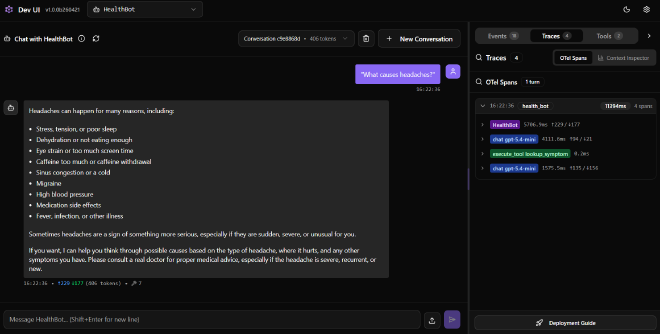
On top of that, the Foundry Toolkit extension for VS Code (formerly the AI Toolkit) adds an OpenTelemetry trace viewer, so once you call configure_otel_providers() you can watch every LLM call, tool invocation and token count for a run right inside the editor. I cover both DevUI and tracing in the workshop.
Wrap-up#
The Microsoft Agent Framework really does bring the best of both worlds together: AutoGen’s orchestration muscle and Semantic Kernel’s enterprise features, now stable and shipping as 1.0.0. For me the highlights are the leaner developer experience without the Kernel, being able to swap model providers in one line, and Workflows plus Magentic orchestration for coordinating multiple agents, with DevUI and the Foundry Toolkit making it genuinely pleasant to build and debug.
If you want to get hands-on, clone my Microsoft Agent Framework Workshop and work through it lesson by lesson. And if you are coming from Semantic Kernel or AutoGen, the official migration guides should make the move a good bit easier, do not expect it to be completely painless, but they give you a solid starting point. This space is still moving fast, so treat this as a snapshot, but the foundation feels solid now. Happy building!
Sources#
Everything I referenced while writing this post:
- Introducing Microsoft Agent Framework (release blog)
- Microsoft Agent Framework 1.0 (GA announcement)
- Microsoft Agent Framework overview
- Providers overview
- Python 2026 significant changes guide
- Migrate from AutoGen
- Migrate from Semantic Kernel
- Foundry infrastructure Bicep templates
- Agent Framework GitHub repo
- Quickstart guide
- Foundry Toolkit for VS Code
- My Microsoft Agent Framework Workshop
- My Semantic Kernel multi-agent post
And a few videos worth watching: