Intro#
Here is a line I keep coming back to: the agent is code, not clicks. It is easy to build an agent by dragging things around in a portal. It is a lot harder to answer the boring production questions that follow: which version is running, who reviewed the last prompt change, and how do I roll it back? The moment an agent goes to production, it has to live where the rest of your system lives, in Git, behind a pipeline.
That is exactly what declarative agents in Microsoft Foundry give you. In this post I want to unpack what “declarative” means for both prompt agents and hosted agents, why treating your agent as code is such a big deal, and how to continuously deploy one with GitHub Actions, including the app registration, OIDC, and role setup the pipeline actually needs. To keep it copy-and-runnable I built a tiny companion repo, foundry-declarative-agent, that you can clone and follow along with. The example agent, TrialFinder, uses Foundry’s native web search tool to surface currently recruiting clinical trials from public sources. Let’s dig in.
Overview#
What makes an agent “declarative”?#
Foundry gives you two shapes of agent, and both can be declarative:
- Prompt agents are defined entirely by configuration: a model deployment, a set of instructions, and some tools. There is no application code to run, Foundry runs the agent for you. The whole definition is a small artifact you can put in a file.
- Hosted agents are your own code (Python or C#) that Foundry hosts and scales. They are still declared through a committed
azure.yamland deployed with a pipeline. I covered these in depth in my hosted agents post.
The unifying idea is the important part: the agent’s definition is a versioned artifact, not a state you poke into a UI. In the companion repo, that artifact is a single file, .foundry/agent-metadata.yaml:
apiVersion: foundry/v1
kind: PromptAgent

agentName: trial-finder
description: Finds currently recruiting clinical trials from public sources via web search.

# Instructions live in their own reviewable file
instructions_file: prompts/system.md

# Native, out-of-the-box web search tool (no connection to provision)
tools:
  - type: web_search
That is the entire agent: its instructions, a name, and a tool. The web search tool is native to Foundry, no application to host and no connection to wire up, so the agent gains a real capability without any infrastructure. The model deployment is supplied at deploy time from an environment variable, and the instructions sit in their own prompts/system.md, so a prompt tweak is a one-line diff you can review like any other change.
NOTE: the native web search tool (“Search the web with Bing Search” in the portal) needs no setup. Only the domain-restricted variant, Bing Custom Search, requires a connection. Either way it is billed through Grounding with Bing, so it is not free.
Why bother? The benefits of agents as code#
Once the agent is a file in your repo, it inherits everything Git and CI already give the rest of your app:
- Reproducible. Every deployed agent maps back to a Git SHA. “What’s in production?” has a real answer.
- Reviewable. A prompt change, a new tool, a model bump, each one is a pull request with a diff and an approver, not a silent portal edit.
- Rollback-friendly. Foundry keeps immutable agent versions, so reverting is a revert, not a reconstruction from memory.
- No portal drift. The running agent can’t quietly diverge from what’s in source control, because source control is what deploys it.
- Same pipeline as the app. The agent gets the exact CI/CD treatment as the rest of your app: pull request, review, merge, deploy.
- Auditable and promotable. Point the same definition at a different project or model via config, so promoting an agent across dev and prod is a variable change, not a manual rebuild.
Agents as microservices#
Here is the framing I find most useful: treat the agent like a microservice. It is not code you embed in your app, it is a separate, independently deployed unit your app calls:
- It has its own contract, a versioned definition (this YAML) and a stable endpoint other services invoke.
- It has its own identity: it runs under a Microsoft Entra agent identity (your project’s shared agent identity by default, or a dedicated one once you publish it), and, in CI, the pipeline’s own identity at deploy time.
- It versions independently, editing the prompt ships a new agent version without touching or redeploying the calling app.
- It ships through its own pipeline, the same PR-and-merge flow as any other service.
Independently deployable, contract-first, own identity, own lifecycle. That is a microservice, it just happens to reason with a model.
Requirements#
To follow along with the companion repo:
- A Microsoft Foundry project with a chat model deployment (I use
gpt-5.4-mini). - The
Foundry Userrole on your Foundry resource for your own user principal, this is what grants the data-planeagents/writeaction that creating an agent version needs. If you created the project as an Azure Owner (and so can assign roles), Foundry adds this for you automatically; a plain Contributor, or the pipeline’s service principal later, won’t have it, so assign it explicitly. - The web search tool available on your project. General web search is native (nothing to provision), but it is billed via Grounding with Bing and an admin can enable or disable it.
- The Azure CLI and the GitHub CLI (handy for the CI setup below).
- Python 3.12+.
- A GitHub repo, we’ll wire it to Azure with OIDC / workload identity federation, no long-lived secrets.
- To run the CI setup below, permission to register an Entra app (the
Application Developerrole, or a tenant that allows app registrations), to assign Azure roles on the Foundry resource (Owner,User Access Administrator, orRole Based Access Control Administrator), and admin on the GitHub repo (to set Actions secrets and variables).
Coding#
1. The agent lives in the repo#
We already saw .foundry/agent-metadata.yaml above. The key move is that this file, plus prompts/system.md, is the agent. Nobody authors it in a UI, and honestly I don’t want my agents authored in a UI anyway, I want them in Git where every change is reviewable.
2. Create a version locally#
Before wiring any pipeline, prove it locally. A small script, scripts/sync_agent.py, turns the YAML into an agent version. Condensed to its essentials, it reads the declarative file, builds a PromptAgentDefinition, and calls create_version:
# --- Illustrative excerpt only, run scripts/sync_agent.py in the repo ---
from azure.ai.projects import AIProjectClient
from azure.ai.projects.models import PromptAgentDefinition, WebSearchTool
from azure.identity import DefaultAzureCredential

meta = yaml.safe_load(META_PATH.read_text())     # the declarative agent-metadata.yaml
definition = PromptAgentDefinition(
    model=os.environ["AZURE_AI_MODEL_DEPLOYMENT"],
    instructions=instructions,                   # loaded from prompts/system.md
    tools=[WebSearchTool()],                      # the `- type: web_search` entry
)

client = AIProjectClient(endpoint=endpoint, credential=DefaultAzureCredential())
version = client.agents.create_version(agent_name=agent_name, definition=definition)
# --- End illustrative excerpt ---
Three things worth noting: the tools: list in the YAML maps to SDK tool objects (web_search becomes WebSearchTool()), DefaultAzureCredential means the same code authenticates with your az login locally and with the pipeline’s identity in CI, and every create_version call produces a new immutable version. The excerpt above trims the env-var checks and the YAML-to-tools mapping for readability, so run the full sync_agent.py, not this snippet, but the shape is exactly that. It reads its config from the environment, so on your machine it just uses your az login:
python -m venv .venv && source .venv/bin/activate
pip install -r requirements.txt
cp .env.example .env          # set your project endpoint + model deployment
set -a && source .env && set +a
az login
python scripts/sync_agent.py
# -> Created agent version: name=trial-finder version=1
Open the agent in the Foundry playground and ask it something like “Find currently recruiting phase 3 melanoma immunotherapy trials in Europe”, it web-searches and answers.
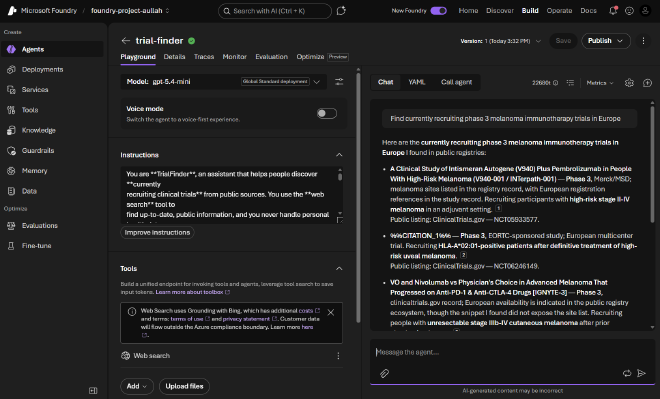
Edit prompts/system.md, run the script again, and you get version 2. That is the whole thesis: a prompt diff produces a new immutable version, no portal.
NOTE: if you hit a 403 like “does not have permissions for …agents/write”, that is the data-plane role. Assign yourself Foundry User on the Foundry resource and retry.
3. Set up continuous deployment (GitHub Actions)#
The pipeline runs the same sync_agent.py, but a fresh GitHub runner has no az login. So we give the pipeline its own identity and let it authenticate with OIDC, no stored secret. It is four one-time steps.
a. Create an app registration. The identity CI acts as:
APP_ID=$(az ad app create --display-name "foundry-declarative-agent-ci" --query appId -o tsv)
az ad sp create --id "$APP_ID"
b. Add a federated credential. So Entra trusts GitHub’s token instead of a secret. The one field that must match exactly is the subject, and GitHub will tell you what it emits, so read it rather than guess it:
# GitHub's exact subject prefix for your repo (modern accounts embed numeric IDs)
SUBJECT="$(gh api /repos/beyondelastic/foundry-declarative-agent/actions/oidc/customization/sub --jq .sub_claim_prefix):ref:refs/heads/main"
echo "$SUBJECT"   # e.g. repo:beyondelastic@11375951/foundry-declarative-agent@1323781534:ref:refs/heads/main

az ad app federated-credential create --id "$APP_ID" --parameters "$(jq -n --arg sub "$SUBJECT" '{
  name: "github-main",
  issuer: "https://token.actions.githubusercontent.com",
  subject: $sub,
  audiences: ["api://AzureADTokenExchange"]
}')"
Replace beyondelastic/foundry-declarative-agent with your own <owner>/<repo>. Reading the subject from sub_claim_prefix is the reliable move because repositories created after July 15, 2026 use GitHub’s immutable subject format with owner and repo IDs (repo:owner@ownerID/repo@repoID:ref:...), while older repos use the legacy repo:owner/repo:..., sub_claim_prefix gives you the right one either way. Merging a PR into main counts as a push to main, so this one credential covers the whole PR-and-merge flow. You’d only add a :pull_request credential (and a pull_request trigger) if you also run the workflow on the PR itself before merge.
NOTE: if azure/login fails later with AADSTS700213: No matching federated identity record, the subject didn’t match. The run log prints the exact subject claim just above the error, copy that literal value into the credential’s subject.
c. Assign the role. The same Foundry User you gave yourself, now for the pipeline’s identity:
SP_OID=$(az ad sp show --id "$APP_ID" --query id -o tsv)
az role assignment create \
  --assignee-object-id "$SP_OID" \
  --assignee-principal-type ServicePrincipal \
  --role "Foundry User" \
  --scope "/subscriptions/<sub>/resourceGroups/<rg>/providers/Microsoft.CognitiveServices/accounts/<foundry-account>"
d. Tell GitHub who to be and what to target. The three IDs go in secrets (they are identifiers, not passwords, the OIDC exchange does the real auth); the config goes in variables:
gh secret set AZURE_CLIENT_ID --body "$APP_ID"
gh secret set AZURE_TENANT_ID --body "$(az account show --query tenantId -o tsv)"
gh secret set AZURE_SUBSCRIPTION_ID --body "$(az account show --query id -o tsv)"

gh variable set AZURE_AI_PROJECT_ENDPOINT --body "https://<res>.services.ai.azure.com/api/projects/<project>"
gh variable set AZURE_AI_MODEL_DEPLOYMENT --body "gpt-5.4-mini"
gh variable set AZURE_FOUNDRY_AGENT_NAME --body "trial-finder"
With that in place, .github/workflows/deploy.yml runs the sync on every merge:
name: deploy-agent
on:
  push:
    branches: [main]
    paths: ['.foundry/**', 'scripts/sync_agent.py']
  workflow_dispatch:

permissions:
  id-token: write     # lets the job request the OIDC token
  contents: read

jobs:
  sync-agent:
    runs-on: ubuntu-latest
    steps:
      - uses: actions/checkout@v4
      - uses: actions/setup-python@v5
        with:
          python-version: "3.12"
      - run: pip install -r requirements.txt
      - name: Azure login (OIDC)
        uses: azure/login@v2
        with:
          client-id: ${{ secrets.AZURE_CLIENT_ID }}
          tenant-id: ${{ secrets.AZURE_TENANT_ID }}
          subscription-id: ${{ secrets.AZURE_SUBSCRIPTION_ID }}
      - name: Reconcile the declarative agent
        env:
          AZURE_AI_PROJECT_ENDPOINT: ${{ vars.AZURE_AI_PROJECT_ENDPOINT }}
          AZURE_AI_MODEL_DEPLOYMENT: ${{ vars.AZURE_AI_MODEL_DEPLOYMENT }}
          AZURE_FOUNDRY_AGENT_NAME: ${{ vars.AZURE_FOUNDRY_AGENT_NAME }}
        run: python scripts/sync_agent.py
The three moving parts: permissions: id-token: write lets the job mint the OIDC token, azure/login@v2 exchanges it for an Azure token as your app, and DefaultAzureCredential in the script picks that up, exactly like your laptop run, minus the secret.
OIDC then azure/login] GA -->|python sync_agent.py| Foundry[Foundry
new agent version]
4. The payoff: change the prompt, ship a version#
This is where it clicks. Say compliance decides the informational disclaimer should appear on every reply, not just the ones that name a specific trial. In .foundry/prompts/system.md that is a one-line change:
- End any response that names specific trials with: *Informational only ...*
+ End every response with: *Informational only ...*
Open a PR, get it reviewed, and merge. The push to main triggers the workflow, which runs the same sync_agent.py, and Foundry gets a new agent version, all from a Git diff, no portal clicks.
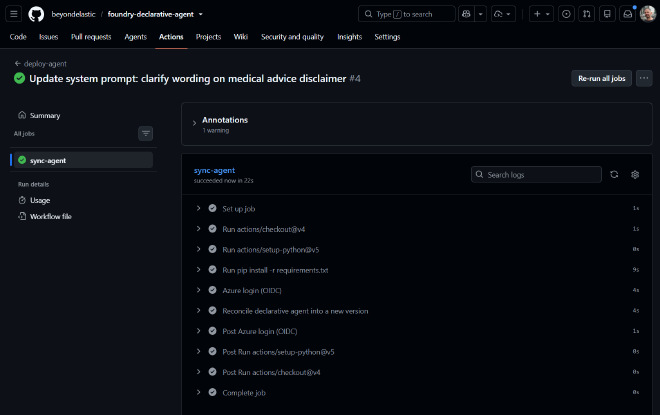

Ask the agent anything in the playground now and the disclaimer is there every time. A product ask, delivered as a reviewed change with an audit trail instead of a portal edit nobody can trace.
TIP: your local run and the CI job call the exact same sync_agent.py, so “works on my machine” and “works in the pipeline” are, for once, the same code path.
Closing#
Declarative agents are the natural endpoint of taking agents seriously as production software. Once the definition is a file, everything good about modern DevOps just applies: pull requests, reproducible deploys, rollbacks, environment promotion, and the same pipeline for your agent as for your API. Prompt agent or hosted agent, the agent stops being a special snowflake in a portal and becomes what it always should have been, a versioned, reviewable, independently deployable service.
If you want to build it yourself, clone the minimal foundry-declarative-agent and run through it top to bottom, it is the exact flow from this post. And if you want the other half of the story, bringing your own code as a hosted agent, that’s my hosted agents post. Happy shipping!
Sources#
- foundry-declarative-agent (companion repo)
- Create a prompt agent (Microsoft Learn quickstart)
- Web search tool in Foundry Agent Service (Microsoft Learn)
- Role-based access control for Microsoft Foundry (Microsoft Learn)
- Hosted agents in Foundry Agent Service (Microsoft Learn)
- Workload identity federation (Microsoft Learn)
- Security hardening with OpenID Connect (GitHub Docs)
- Azure CLI
- GitHub CLI