Intro#
The platform formerly known as Azure AI Foundry has quietly turned into something quite different over the course of this year: a new name, a new portal, and a genuinely new engine under the hood. Welcome to Microsoft Foundry and the V2 wave of changes. None of this landed overnight, it has been rolling out in stages since the beginning of the year, for example the Foundry Agent Service went GA back in March. By now enough of it has settled that it is worth stepping back and looking at the whole picture. If you have read my earlier post Azure AI Foundry News & Changes, this is the sequel: what was in preview back then has matured, the rebrand is official, and the way we build agents has changed quite a bit.
In this post I want to give you a quick overview of the most important changes first, then dive into the details with code examples: the Responses API, conversations replacing threads, prompt agents, the growing set of Foundry tools, the new portal UI, and how you operate and monitor everything. I will also call out what changed compared to my previous Foundry post, because the shift from threads and runs to conversations and responses is the part that will bite you if you copy old code. Let’s check it out.
NOTE: A lot of this space is moving fast, and some capabilities are still in preview. I link to the official docs throughout so you always have the current state of GA vs preview.
Overview: the big changes#
Let’s start with the headline changes before we get into code. The single most important thing to internalize is that this is not just a rename, it is a new API generation. The official What is Microsoft Foundry? doc has a great mapping table from the old world to the new one. Here is the short version:
| Dimension | Previous (classic) | Current (V2) |
|---|---|---|
| Brand | Azure AI Studio / Azure AI Foundry | Microsoft Foundry |
| Azure AI Services | Azure AI Services | Foundry Tools |
| Portal | Foundry (classic) | Foundry (new portal) |
| Agent API | Assistants API (Agents v0.5/v1) | Responses API (Agents v2) |
| API versioning | Monthly api-version params | v1 stable routes (/openai/v1/) |
| Resource model | Hub + Azure OpenAI + Azure AI Services | Foundry resource (single, with projects) |
| SDKs & endpoints | Multiple packages against 5+ endpoints | Unified project client (azure-ai-projects 2.x) + OpenAI() |
| Terminology | Threads, Messages, Runs, Assistants | Conversations, Items, Responses, Agent Versions |
If you only remember one row, make it the last one. Threads, messages, runs, and assistants are
out. Conversations, items, responses, and agent versions are in. Everything now builds on the
Responses API, the same modern primitive you may know from OpenAI, exposed through stable
/openai/v1/ routes so you are no longer chasing monthly api-version strings.
The other big story is the resource simplification I teased in my last post. In the classic Hub-based world you needed a whole pile of Azure resources. The new model is a single Foundry resource with projects, and the old Azure AI Services brand is now called Foundry Tools. One resource provider namespace, unified RBAC, networking, and policies.
TIP: Coming from a plain Azure OpenAI resource? You can upgrade it to a Foundry resource and keep your endpoint, keys, and existing state.
What changed since my last Foundry post#
In my previous Foundry post I was still using threads, messages, and runs, and there was no Responses API in sight. Here is the exact code I wrote back then to talk to an agent:
# The old way: threads + messages + runs
thread = project_client.agents.threads.create()

message = project_client.agents.messages.create(
    thread_id=thread.id,
    role="user",
    content="Who is the greatest Basketball player of all time?",
)

run = project_client.agents.runs.create_and_process(
    thread_id=thread.id,
    agent_id=agent.id,
)
In V2 that same interaction becomes a conversation plus a response. Runs with their queued/in-progress polling loops are gone, and you talk to the model through the OpenAI-compatible client that the project hands you:
# The new way: conversations + responses
conversation = openai.conversations.create(
    items=[
        {
            "type": "message",
            "role": "user",
            "content": "Who is the greatest Basketball player of all time?",
        }
    ],
)

response = openai.responses.create(
    conversation=conversation.id,
    input="Who is the greatest Basketball player of all time?",
    extra_body={
        "agent_reference": {"name": agent.name, "type": "agent_reference"},
    },
)
Microsoft published a detailed Migrate to the new Foundry Agent Service guide that walks through threads to conversations, runs to responses, and assistants to new agents. There is even a migration tool that automates the code constructs for you. One caveat worth repeating from the docs: the migration tool moves your code, not your state. Old threads, runs, and messages are not migrated, so you start fresh conversations after moving over.
Here is the mental model as a diagram:
Setup and the Responses API#
Let’s build this up from scratch. First, grab the SDK. The V2 surface lives in azure-ai-projects
2.x (it pulls in the openai package as a dependency), and you’ll want azure-identity for
DefaultAzureCredential:
pip install "azure-ai-projects>=2.3.0" azure-identity
As before, you connect with a project endpoint (no more connection strings) and
DefaultAzureCredential. The new twist is that the project client hands you an
OpenAI-compatible client via get_openai_client(), and that is what you use for conversations
and responses:
from azure.identity import DefaultAzureCredential
from azure.ai.projects import AIProjectClient

# Format: https://<resource>.services.ai.azure.com/api/projects/<project>
PROJECT_ENDPOINT = "your_project_endpoint"

project = AIProjectClient(
    endpoint=PROJECT_ENDPOINT,
    credential=DefaultAzureCredential(),
)

# The OpenAI-compatible client for conversations and responses
openai = project.get_openai_client()
The simplest thing you can do is a plain model call through the Responses API, no agent required:
response = openai.responses.create(
    model="gpt-5-mini",
    input="What are the common symptoms of type 2 diabetes?",
)
print(response.output_text)
That is the whole point of V2: one project endpoint, one OpenAI-compatible client for every model,
one Responses API. The same responses.create() call is used whether you hit a raw model or route
through an agent. You can even let Foundry pick the model for you with
model routing.
NOTE: The division of labor trips people up at first. Use the project client for agent creation
and versioning, and the OpenAI client (project.get_openai_client()) for conversations and
responses. If you call conversations.create() on the project client, it will not exist.
Conversations instead of threads#
A conversation is the successor to a thread, but it stores a stream of items, not just messages. Items can be messages, tool calls, tool outputs, and more. You create one, then keep sending responses against it, and it retains context across calls automatically. Here is a complete two-turn exchange, no agent required, just a model and the conversation:
# The conversation holds the running state
conversation = openai.conversations.create(
    metadata={"agent": "patient-education-agent"},
)

# First turn: the response is appended to the conversation automatically
response = openai.responses.create(
    model="gpt-5-mini",
    conversation=conversation.id,
    input="Explain what an mRNA vaccine is in one sentence.",
)
print(response.output_text)

# Follow-up turn: notice we never repeat the earlier context,
# the conversation remembers it for us
response = openai.responses.create(
    model="gpt-5-mini",
    conversation=conversation.id,
    input="How is it different from a traditional vaccine?",
)
print(response.output_text)
That second question only makes sense because the conversation carried the context from the first
turn. A multi-turn chat is just repeated responses.create() calls that reference the same
conversation.id, no more manual message list juggling. If you ever need to seed a conversation with
prior items without generating a response, you can add them directly with
openai.conversations.items.create(conversation_id=..., items=[...]).
Prompt agents#
Agents themselves got a redesign too. Instead of create_agent(), you now create versions of an
agent with a structured definition. The most common type is a prompt agent: a declarative agent
defined by a model plus instructions (and optionally tools). Here is the pattern straight from the
migration guide and my
Foundry workshop:
from azure.ai.projects.models import CodeInterpreterTool, PromptAgentDefinition

agent = project.agents.create_version(
    agent_name="lab-results-agent",
    definition=PromptAgentDefinition(
        model="gpt-5-mini",
        instructions=(
            "You politely help interpret patient lab results. Use the Code "
            "Interpreter tool when asked to visualize biomarker trends."
        ),
        tools=[CodeInterpreterTool()],
    ),
)
Note that the instructions reference the Code Interpreter tool, but the guidance alone is not enough,
you also have to attach the tool via tools=[CodeInterpreterTool()]. It is a built-in tool, so
Foundry runs it server-side in a sandbox and you do not need to host anything or add a connection. With
the tool attached, the plot request below can actually execute Python and return a chart.
Notice the two nice properties this gives you. First, versioning is built in: every call to
create_version() under the same agent_name produces a new version (lab-results-agent:1,
lab-results-agent:2, and so on), so you can iterate without deleting the old one. Second, there is
a clean separation of duties: you define the agent once, then execute it with different inputs by
passing an agent_reference on your responses.
To actually talk to the agent, you combine everything from above: a conversation for state, and a response that references the agent:
# A fresh conversation to hold the agent's working state
conversation = openai.conversations.create()

response = openai.responses.create(
    conversation=conversation.id,
    input=(
        "Plot this patient's HbA1c readings over the last six months: "
        "7.8, 7.4, 7.1, 6.9, 6.7, 6.5."
    ),
    extra_body={
        "agent_reference": {"name": agent.name, "type": "agent_reference"},
    },
)

for item in response.output:
    if item.type == "message":
        for block in item.content:
            print(block.text)
The loop above prints the agent’s text explanation. The chart itself comes back as its own output
item (Code Interpreter returns files/images separately, not inside output_text), so in a real app
you would also iterate the non-message items to grab the generated image.
There is a second agent type, the Hosted agent, for running your own agent code and containers on Foundry. That deserves its own hands-on walkthrough, so I will cover Hosted agents in a separate post. For this one, prompt agents are all we need.
Foundry tools#
Tools are where V2 really opens up. The new Foundry Agent Service ships a broad set of built-in tools, some carried over from classic and some brand new. A few highlights from the migration guide’s tool availability table:
| Tool | Classic | V2 |
|---|---|---|
| Web Search | No | Yes (GA) |
| Image Generation | No | Yes (Public Preview) |
| MCP | Public Preview | Yes (GA) |
| Agent to Agent (A2A) | No | Yes (Public Preview) |
| Code Interpreter | Yes (GA) | Yes (GA) |
| File Search | Yes (GA) | Yes (GA) |
| Azure AI Search | Yes (GA) | Yes (GA) |
| Grounding with Bing Search | Yes (GA) | Yes (GA) |
| OpenAPI | Yes (GA) | Yes (GA) |
Two things jump out for me: MCP is now GA (it was preview in my last post), and Web Search and Image Generation are new. Beyond the built-ins, Foundry now has a tool catalog with over 1,400 tools via public and private catalogs.
Adding a tool to a prompt agent is just a line in the definition. Here is the web search example from my workshop’s tool calls lab, and the official web search tool docs have the full reference:
from azure.ai.projects.models import PromptAgentDefinition, WebSearchTool

agent = project.agents.create_version(
    agent_name="clinical-web-search-agent",
    definition=PromptAgentDefinition(
        model="gpt-5-mini",
        instructions="Answer medical questions and use web search for recent clinical guidelines.",
        tools=[WebSearchTool()],
    ),
)
When you send a time-sensitive question through responses.create(), the agent decides on its own to
call the tool. The final answer still comes back as plain text, but the response payload also includes
structured items describing what happened, so you can confirm the tool actually ran:
response = openai.responses.create(
    input="What are the latest FDA-approved treatments for rheumatoid arthritis?",
    extra_body={
        "agent_reference": {"name": agent.name, "type": "agent_reference"},
    },
)

# The answer itself is plain text
print(response.output_text)

# ...but the structured items tell you whether web search was actually used
tool_used = any(
    getattr(item, "type", "") == "web_search_call" for item in response.output
)
print(f"Web search tool used: {tool_used}")
TIP: A tool-backed answer and a plain model answer look identical to the user. The structured items in the response are how you verify grounding actually happened, which is gold for debugging and evaluation.
The new portal#
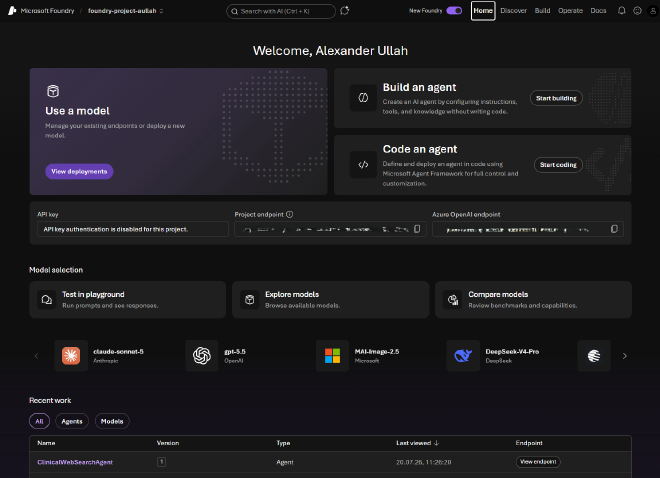
The portal moved too. Everything now lives at ai.azure.com, and to get the V2 experience you make sure the New Foundry toggle in the banner is switched on. Foundry (classic) still exists for Hub-based projects, but all new investment is going into the new portal.
If you are used to the classic layout, some things moved around. Microsoft has a handy Find features in the Foundry portal guide to help you relocate everything. The playgrounds are still there for trying models and agents in the browser before you drop into code, and of course my favorite workflow, developing in VS Code, is fully supported through the Microsoft Foundry for VS Code extension.
Here are the parts of the new UI I think are worth showing.
The new portal home at ai.azure.com with the “New Foundry” toggle switched on in the banner:
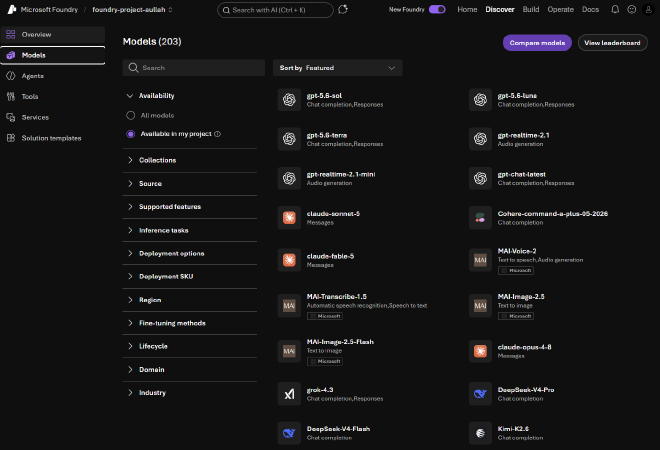
The model catalog under the “Discover” tab, to choose from over 11,000 different models:
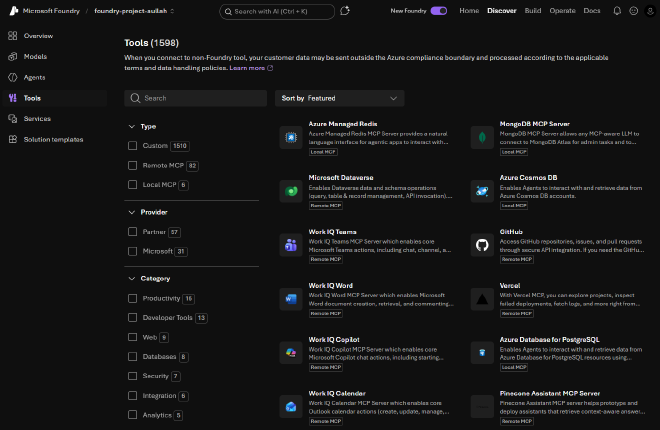
Foundry Tools, also under the “Discover” tab, where you browse the tool catalog and configure tools for your agents:
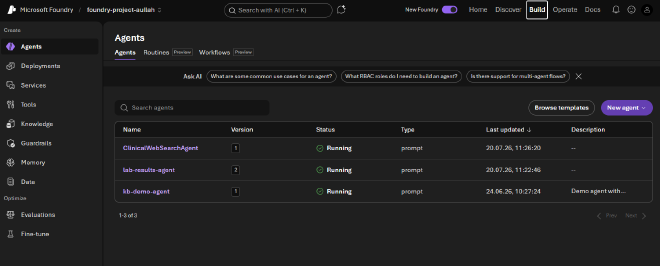
The Agents view (list of agents and agent versions) in the new portal under the “Build” tab:
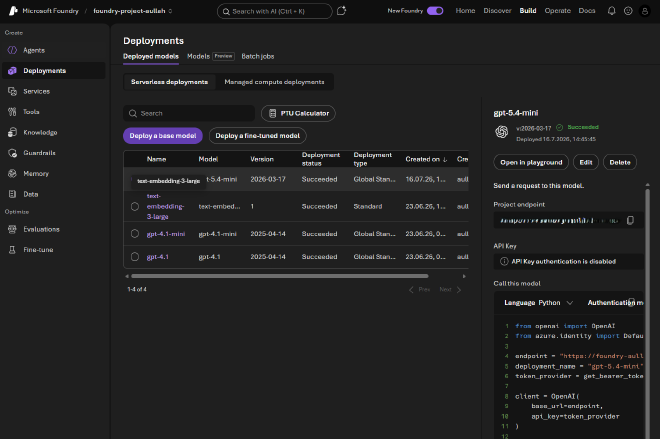
The deployments view to list all your model deployments:
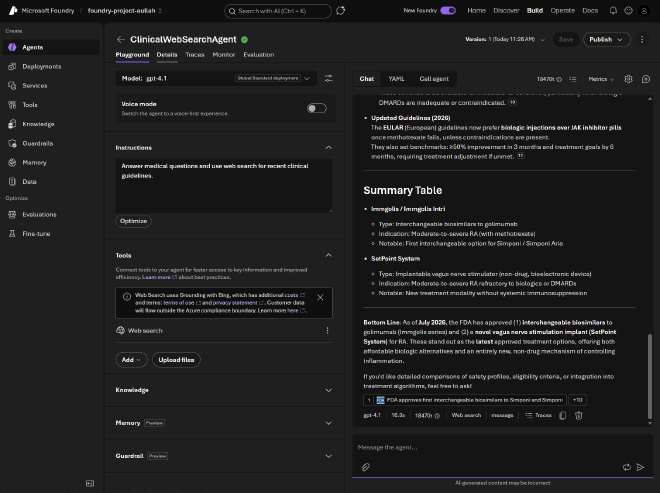
The playground for trying a model or agent in the browser:
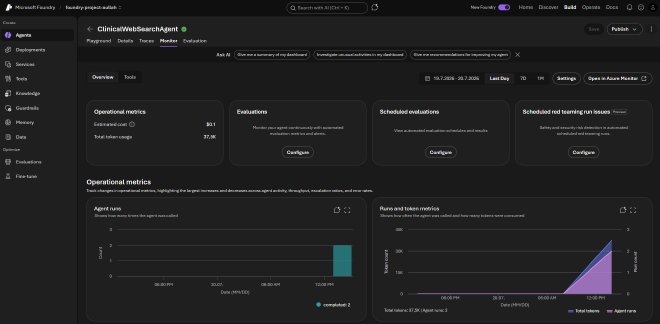
The monitor agents dashboard with metrics, agent runs, and more:
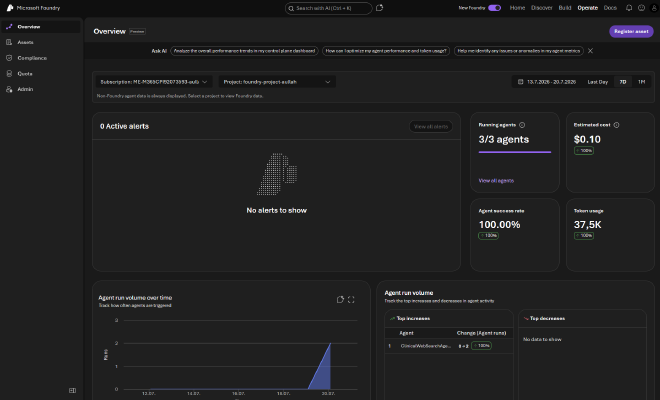
The Operate overview dashboard under the “Operate” tab, with alerts, success rates, token usage, and cost:
Operate and monitor#
The part I appreciate most as a platform person is that operate and monitor is now first-class, not an afterthought. The new portal has a dedicated Operate section for centralized management of all your AI assets: agents, models, and tools in one place, including agents registered from other clouds.
On the observability side, Foundry gives you:
- Near-real-time observability with built-in operational metrics (token usage, latency, run success rate) surfaced in the monitor agents dashboard. It reads telemetry from a connected Application Insights resource, so expect a short ingestion delay rather than a live stream.
- Continuous evaluation so you keep scoring quality and safety on live traffic, not just in a one-off test run.
- Tracing built on OpenTelemetry, which you can wire up in a few lines and then inspect the traces right inside Foundry. I walk through exactly this in my workshop’s observability lab.
- Enterprise controls: full authentication for MCP and A2A, AI gateway integration, and Azure Policy support.
That combination of build, operate, and govern under one resource is really what “V2” is about for me. It is less a fresh coat of paint and more a consolidation of the whole lifecycle.
NOTE: a few of these pieces are still in public preview, such as the portal View agent metrics view, scheduled evaluations, red team scans, and alerts. Expect them to keep evolving.
A few things I did not cover#
Foundry V2 is broad, so I deliberately kept this post on the core building blocks. A few areas I skipped but that are well worth a look:
- Publishing agents where people already work. Once an agent is ready, you can push it straight to Microsoft 365 Copilot and Teams, so colleagues discover and chat with it without leaving their usual tools. What gets published is the agent’s stable endpoint, so you can roll out new versions behind the scenes.
- Multi-agent orchestration. For coordinating several specialized agents, the go-to engine is Microsoft Agent Framework, which I wrote a whole post on. The Foundry portal also has a visual Workflows designer, but it is being retired on December 1, 2026, so for anything new I would start with Agent Framework.
- Foundry IQ. A managed knowledge layer that connects agents to your enterprise data (Azure Blob Storage, SharePoint, OneLake, and the public web) through agentic retrieval. One knowledge base can serve many agents with permission-aware, citation-backed grounding, so you do not have to wire each agent to each source yourself.
- AI Services in the portal. It is not all LLMs. The portal also surfaces the classic Azure AI capabilities you can use straight from Foundry, like Speech (speech-to-text, text-to-speech, and even a photorealistic text-to-speech avatar), Vision, Language, and more.
And that is still not everything, Foundry keeps growing, so treat this list as a starting point rather than the full map.
Wrap-up#
So where does that leave us? Microsoft Foundry V2 is a meaningful step up from the Azure AI Foundry I wrote about last time. The rebrand is the least interesting part. The real changes are the Responses API as the single primitive, conversations and items replacing threads and messages, versioned prompt agents replacing assistants, a much richer tool story (MCP GA, Web Search, Image Generation), a new portal, and a proper operate and monitor experience.
If you have older Foundry code, do not just copy your threads-and-runs snippets, plan a small migration to conversations and responses. The migration guide and the migration tool make it painless. And if you want a hands-on, runnable path through all of this in Python, I put together a Microsoft Foundry workshop (GitHub repo) that covers model calls, prompt agents, tools, RAG, evaluation, observability, and more.
Next up, I will dig into Hosted agents in a dedicated post, since running your own agent code on Foundry deserves more than a paragraph. Until then, flip on that New Foundry toggle and have fun building.
Sources#
- What is Microsoft Foundry?
- Migrate to the new Foundry Agent Service
- Foundry migration tool (GitHub)
- Microsoft Foundry SDKs and Endpoints
- Quickstart: Build with models and agents
- Model routing with the Responses API
- Agent tool catalog
- Use the web search tool in Foundry Agent Service
- Find features in the Foundry portal
- Monitor agents dashboard
- Microsoft Foundry for VS Code
- My previous post: Azure AI Foundry News & Changes
- Microsoft Foundry workshop and GitHub repo